Dual Cloner - App Dual Space
Publisher Description
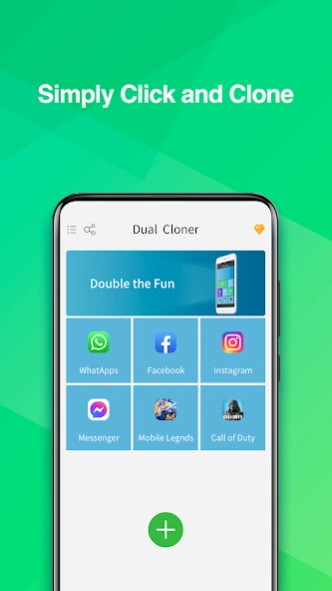


Welcome to Dual Cloner - Your Gateway to Infinite Possibilities!
Are you tired of device hopping between your gaming and social accounts? Dual Cloner is here to revolutionize your digital world. Run unlimited copies of your cherished social and gaming apps on a single device. Elevate your gaming prowess and social interactions to unprecedented heights!
🌐 Key Features for Socializers:
Unlimited Social Cloning: Clone and manage multiple social accounts seamlessly. Switch between work and personal profiles effortlessly.
Tab Between Accounts: Keep your social and gaming accounts separate. Toggle between them with ease, ensuring data privacy.
Secret Zone for Privacy: Delete the original copy of a cloned app and still use the clone. Keep apps invisible on your home screen for enhanced privacy.
Security Lock: Protect sensitive data with a PIN code. Secure select apps so only you can access crucial accounts and information.
🎮 Key Features for Gamers:
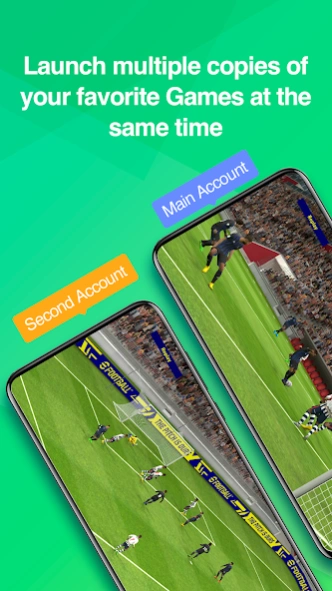
Clone Gaming Apps: Play multiple accounts simultaneously on one device. Gain the edge in games like MLBB, PES, CoD, CoC, and many more!
Dual Account Advantage: Dominate your favorite mobile games with dual accounts. Double the fun, double the victories!
Smooth Gaming Experience: Enjoy lag-free gaming with our cutting-edge technology. No interruptions, just pure gaming pleasure!
🌟 Highlights:
Stable & Secure: Dual Cloner is your fortress of stability, security, and efficiency.
Board Game & App Support: We cover a wide array of games, apps, and devices to ensure compatibility.
Easy-to-Use: Experience the convenience of an app designed for simplicity and ease of use.
Compatible with the Latest Android OS Versions: Always stay ahead with compatibility with the latest Android OS updates!
🌈 Activate Your VIP Membership Now!
Join an elite squad of gamers and unleash the full potential of Dual Cloner. Sign up for VIP membership to maintain access to your cloned games, run unlimited accounts simultaneously, and enjoy enhanced privacy features.
Upgrade to Dual Cloner today and redefine how you experience your favorite games and social apps. Your digital adventure awaits!
Notes:
• Permissions: Dual Cloner requires the same permissions that all major apps request in order to operate normally. The Dual Cloner app does not use these permissions for any purpose other than operating your cloned apps.
• Data & Privacy: To protect user privacy, Dual Cloner does not collect or store any personal information.
• Resources: Dual Cloner does not use any additional memory, battery, or data to run apps. However, cloned apps use their typical amount of these resources when running.
• Notifications: Enable all relevant Notification permissions in your device’s settings for Dual Cloner to ensure you receive notifications from all logged-in accounts.
• Device ID: Dual Cloner does not hide, modify, or change your device identifiers. Creating a cloned app will not create a new device ID, IP address, MAC address, or unique phone number. • Third Party App Policies: Each app sets their own policies regarding the use of more than one account, Dual Cloner is not able to circumvent or override these policies.
If you have any questions, concerns, or feedback about Dual Cloner, please contact us at support@friendlygames.io. We are always happy to help!
About Dual Cloner - App Dual Space
The company that develops Dual Cloner - App Dual Space is Rally Games Co. The latest version released by its developer is 1.0 .
To install Dual Cloner - App Dual Space on your Android device, just click the green Continue To App button above to start the installation process. The app is listed on our website since 2026-09-16 and was downloaded 81 times. We have already checked if the download link is safe, however for your own protection we recommend that you scan the downloaded app with your antivirus. Your antivirus may detect the Dual Cloner - App Dual Space as malware as malware if the download link to com.friendlygames.gamecloner is broken.
How to install Dual Cloner - App Dual Space on your Android device:
- Click on the Continue To App button on our website. This will redirect you to Google Play.
- Once the Dual Cloner - App Dual Space is shown in the Google Play listing of your Android device, you can start its download and installation. Tap on the Install button located below the search bar and to the right of the app icon.
- A pop-up window with the permissions required by Dual Cloner - App Dual Space will be shown. Click on Accept to continue the process.
- Dual Cloner - App Dual Space will be downloaded onto your device, displaying a progress. Once the download completes, the installation will start and you'll get a notification after the installation is finished.
Program Details
System requirements
Download information
Pricing
Version History
version
posted on 2026-09-16
1.Discontinued support for app cloning for apps that declare the REQUIRE_SECURE_ENV flag.
2.Fixed some known bugs.
3.Fully compatible with Android 16.
version 1.4.5
posted on 2025-06-19
1.Discontinued support for app cloning for apps that declare the REQUIRE_SECURE_ENV flag.
2.Fixed some known bugs.
3.Fully compatible with Android 14.
version 1.3.6
posted on 2024-04-18
1.Support Android 13.
2.Support multiple accounts, i.e., second , third, fourth account, etc., all on line at the same time;
3.Support app-lock feature;
4.Support private app feature;
5.Support Shortcut On Android O(8.0 and above);
6.Fix Some Crash Issues;
